
स्टोरीबोर्ड क्या है? यह मुझे जीतने वाला वीडियो बनाने में कैसे मदद करेगा?
वर्तमान उपकरण और संसाधन शामिल करने के लिए अगस्त 2026 में अपडेट किया गया।.
अपने वीडियो की योजना बनाते समय स्टोरीबोर्ड बनाना एक उपयोगी तरीका है। स्टोरीबोर्ड एक ऐसी श्रृंखला होती है जिसमें चित्र शामिल होते हैं और साथ में स्क्रिप्ट भी होती है जो आपके वीडियो प्रोजेक्ट की शुरुआत से अंत तक एक झलक प्रदान करती है। जब यह पूरा हो जाए, तो यह कॉमिक्स की एक श्रृंखला जैसा दिखेगा। आपको स्टोरीबोर्ड बनाने में मदद करने के लिए कई ऑनलाइन विकल्प उपलब्ध हैं, लेकिन आप हाथ से भी एक बना सकते हैं।.
स्टोरीबोर्डिंग के चरण
- आपका वीडियो क्या कहेगा?
- इसके लिए 8 बिलियन की दुनिया, इस बात पर विचार करें कि आपका स्क्रिप्ट इन मुख्य बिंदुओं को किस प्रकार संबोधित करता है:
- आपका वैश्विक विषय और इसका महत्व
- जनसंख्या वृद्धि आपके विषय पर कैसे प्रभाव डालती है
- इस समस्या का क्या स्थायी समाधान हो सकता है
- इसके लिए 8 बिलियन की दुनिया, इस बात पर विचार करें कि आपका स्क्रिप्ट इन मुख्य बिंदुओं को किस प्रकार संबोधित करता है:
- मस्तिष्क मंथन करो!
- सामग्री और छवियों के लिए अपने सभी विचारों को लिखें
- देखें ये विचार आप विभिन्न प्रकार के वीडियो बना सकते हैं
- अपने वीडियो के टाइमलाइन को विकसित करें
- अपने कहानी के आरंभ, मध्य और अंत को तथा किसी भी महत्वपूर्ण परिवर्तन और महत्वपूर्ण क्षणों को पहचानें।
- अपनी विज़ुअल तैयार करें
- अपनी दृश्यों को कागज पर ड्रा करें—याद रखें, इस बात की चिंता न करें कि यह कैसा दिखता है!
- नोट बनाने के लिए कागज पर कुछ जगह छोड़ दें।
- पेंसिल का इस्तेमाल करें ताकि आप अपनी मन बदल सकें।
- विवरण जोड़ें
- कैमरा या लोगों के मूवमेंट को दिखाने के लिए तीर का उपयोग करें
- सहायक सामग्री, पात्रों आदि के बारे में नोट्स जोड़ें।.
- जांच लें और प्रतिक्रिया प्राप्त करें
- अपनी पटकथा को जोर से पढ़ें और उसे समयबद्ध तरीके से पढ़ें ताकि यह सुनिश्चित हो सके कि यह 60 सेकंड से कम हो।
- अपने स्टोरीबोर्ड को सहपाठियों, परिवार या दोस्तों के साथ साझा करें ताकि वे आपकी कल्पनाओं को मजबूत बनाने और चुनौतियों से निपटने में आपकी मदद कर सकें!
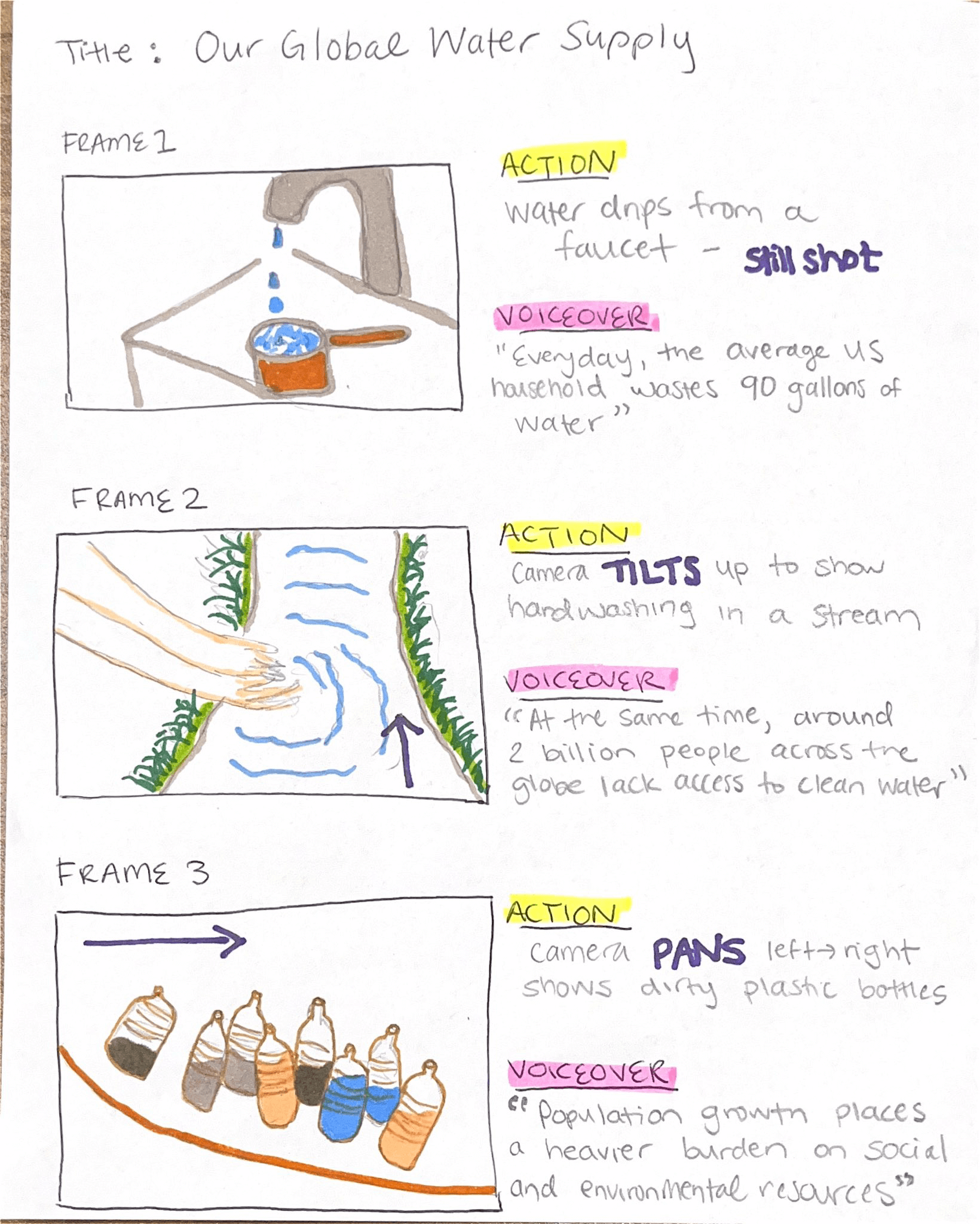
आपको महान कलाकार होने की ज़रूरत नहीं है, और चित्र विस्तृत होने की भी ज़रूरत नहीं है। स्टोरीबोर्ड सिर्फ़ पेज पर अपनी कल्पना को प्रस्तुत करने का एक शानदार तरीका है!
एक स्टोरीबोर्ड बनाने के दौरान विचार करने योग्य प्रश्न
- चित्र
- आप कौन-से दृश्य चित्र या दृश्यों का निर्माण करेंगे?
- यह आपके द्वारा व्यक्त किए जाने वाले संदेश को कैसे बढ़ाएगा या बेहतर बनाएगा?
- रंगों का महत्व
- अलग-अलग रंग कहानी के भावों को कैसे दर्शाते हैं?
- आपके प्रॉप्स, इमेज या बैकग्राउंड के रंग प्रत्येक दृश्य में कैसे योगदान देंगे?
- कैमरा एंगल/गति
- प्रत्येक दृश्य में आपको किस तरह के कैमरा मूवमेंट और कोणों का उपयोग करना होगा?
- आप एक दृश्य से दूसरे दृश्य में कैसे संक्रमण करेंगे?
- विशेष प्रभाव
- क्या आप अपने रिकॉर्ड किए गए वीडियो या छवियों में कोई एनिमेशन या अन्य ग्राफिक्स जोड़ेंगे?
- स्क्रिप्ट
- वीडियो के प्रत्येक भाग में कथानककार क्या कह रहा होगा?
- क्या आप उस सभी प्रासंगिक जानकारी को शामिल कर रहे हैं जो किसी भी मामले में आवश्यक है? शक्तिशाली वीडियो सबमिशन?
एक स्टोरीबोर्ड तैयार करने के तरीके
हाथ से स्टोरीबोर्ड बनाना
यह आपके प्रोजेक्ट के विभिन्न संयोजनों को आजमाने का एक आसान विकल्प है। आपको बस कागज़ और एक पेंसिल चाहिए! अपनी विषयवस्तु को संकुचित करने और अपने 60-सेकंड के स्क्रिप्ट को तैयार करने के लिए प्रारंभिक शोध करने के बाद, आप कहानी के प्रत्येक हिस्से का प्रतिनिधित्व करने वाले चौकों को बनाना शुरू कर सकते हैं। अपनी कल्पनाओं को स्केच करते हुए कथा को शुरू से अंत तक आगे बढ़ाएँ। फिर चौकों और टेक्स्ट को काटकर उन्हें सही क्रम में व्यवस्थित करें।.
डिजिटल स्टोरीबोर्डिंग उपकरण
इसके अलावा ऐसे बहुत सारे टूल भी हैं जो आपको ऑनलाइन स्टोरीबोर्डिंग शुरू करने में मदद करेंगे। डिजिटल स्टोरीबोर्ड्स आसान सहयोग और साझाकरण की सुविधा प्रदान करते हैं, साथ ही इसमें आपकी रचनात्मकता को बढ़ाने के लिए विभिन्न टेम्पलेट और उपकरण भी शामिल हैं। यहाँ देखें यह वेबसाइट एक स्टोरीबोर्ड टेम्पलेट के उदाहरण के लिए।.
यहाँ कुछ और ऑनलाइन स्टोरीबोर्ड विकल्प दिए गए हैं जिनमें मुफ्त सुविधाएं शामिल हैं:
आप इस ब्लॉग को इस लिंक पर भी पढ़ सकते हैं कहानी कहने की कला को निपुण बनाना और भी टिप्स के लिए!
ब्लॉग का थंबनेल फोटो थिस वान डेर वेइड द्वारा लिया गया है: https://www.pexels.com/photo/close-up-photography-of-black-pen-1029577